Library Extension
Your Library, Just a Click Away—Find Books and eBooks Faster!Audible
Amazon's audiobook platform
Overview
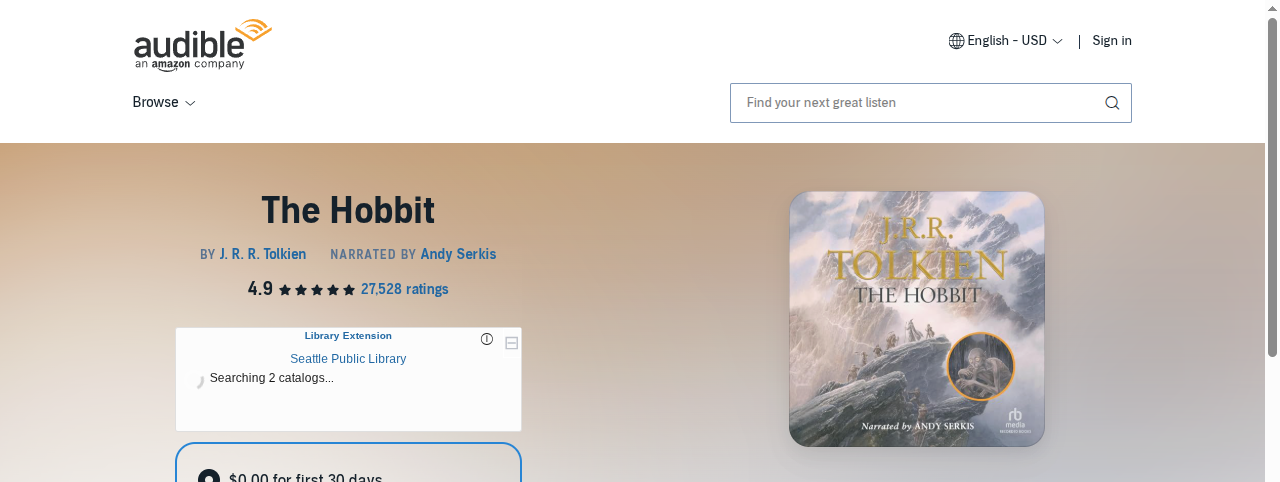
Library Extension works on Audible to help you discover when audiobooks are available through your library’s digital collection. Many libraries offer audiobooks through services like OverDrive/Libby, Hoopla, and others, and Library Extension makes it easy to check availability while browsing Audible.
How It Works
When you’re viewing an audiobook on Audible, Library Extension:
- Automatically detects the audiobook title and narrator information
- Searches your library’s digital audiobook collections
- Displays availability near the purchase button
- Provides direct links to borrow from your library
The extension appears in the buy box area, making it easy to compare whether to purchase or borrow.
Screenshots
Desktop View
Features
- Audiobook-specific search: Optimized for finding audiobook formats at your library
- Narrator information: Uses narrator details to help identify the right edition
- Digital collection focus: Searches OverDrive, Hoopla, and other digital platforms
- Quick borrow: Direct links to check out audiobooks from your library
Digital Library Platforms
Library Extension can find audiobooks from:
- OverDrive/Libby
- Hoopla
- Cloud Library
- Axis360
- BorrowBox
Make sure your library’s digital collections are configured in your Library Extension settings.
Tips
- The extension specifically searches for audiobook formats at your library
- If your library has the book but not the audiobook, you may still see physical book results
- Many libraries have different audiobook collections through different platforms
- Some audiobooks may have different narrators - the extension tries to match the specific version